一,shiro的基本概念
shiro是主流的权限管理框架:
什么是权限管理:
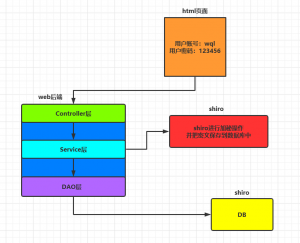
基本上涉及到用户参与的系统都需要进行权限管理,权限管理属于系统安全的范畴,权限管理实现对用户系统访问的控制,按照安全规则和安全cenr控制用户可以访问被授权的功能
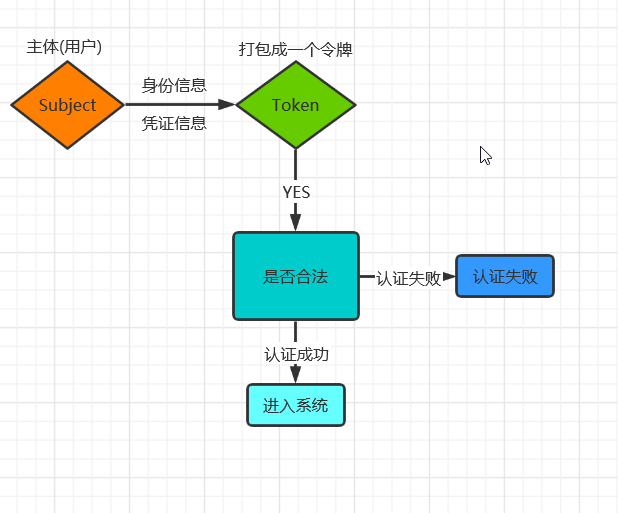
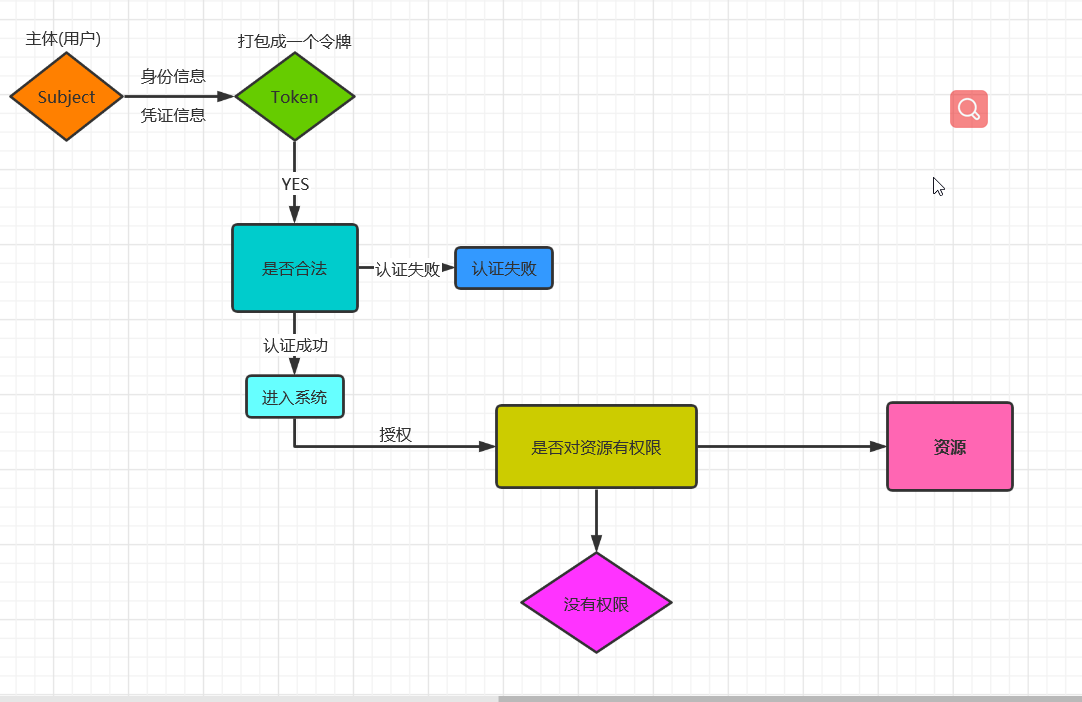
权限管理包括用户认证和授权两部分,简称认证授权,对于需要访问控制资源的用户首先经过身份认证,认证通过之后在进行资源的访问授权认证
shiro是apache下的一个开源权限框架


路漫漫其修远兮,吾将上下而求索







发布于 2021-04-17 5.38k 次阅读
subject:主体
Security Manage:安全管理
Authenticator:认证
Authorizer:授权
Session Manager:会话管理
SessionDAO
Cache Manager
Realma:获取会话和授权的数据
<dependency>
<groupId>org.apache.shiro</groupId>
<artifactId>shiro-core</artifactId>
<version>1.5.3</version>
</dependency>
常见异常UnknownAccountException用户名不存在 IncorrectCredentialsException密码不存在

public class testAuthenticator {

public static void main(String[] args) {

//1,创建安全管理器

DefaultSecurityManager securityManager = new DefaultSecurityManager();

//2,给安全管理器设置realm(获取安全实体数据源,假如没有指定义数据源shiro.ini是默认读取的数据源)

securityManager.setRealm(new IniRealm("classpath:shiro.ini"));

//3,SecurityUtils 给全局的安全工具类设置安全管理器

SecurityUtils.setSecurityManager(securityManager);

//4,提供工具类获取subject关键对象

Subject subject = SecurityUtils.getSubject();

//5,创建令牌

UsernamePasswordToken token = new UsernamePasswordToken("wql","12s3");

try {

System.out.println(subject.isAuthenticated());

subject.login(token);

System.out.println(subject.isAuthenticated());

//常见异常UnknownAccountException用户名不存在 IncorrectCredentialsException密码不存在

}catch (UnknownAccountException a){

System.out.println("用户名不存在!!");

}catch (IncorrectCredentialsException e){

System.out.println("密码不存在");

}
二,自定义realm实现认证
自定义realm需要继承AuthorizingRealm类来实现
realm是实体数据源,默认是shiro.ini文件获取认证源数据,我们需要把realm更改成自定义的源比如从数据库中获取
主类:
//自定义Realm的实现

public class defindAuthenticator {

    public static void main(String[] args) {

        //创建securityManager

        DefaultSecurityManager defaultSecurityManager = new DefaultSecurityManager();

        //设置自定义realm

        defaultSecurityManager.setRealm(new authenticat());

        //创建工具类

        SecurityUtils.setSecurityManager(defaultSecurityManager);

        //subject

       Subject subject = SecurityUtils.getSubject();

       UsernamePasswordToken token = new UsernamePasswordToken("wql","123");

       try {

           subject.login(token);

       }catch (UnknownAccountException e){

           System.out.println("用户不存在!");

       }catch (IncorrectCredentialsException e){

           System.out.println("密码不存在!");

       }

    }
shiro默认realm的源码:
在默认realm情况下数据的认证在SimpleAccountRealm(在shiro.ini数据源):默认数据的认证的底层源码
//以默认数据的认证的底层源码

protected AuthenticationInfo doGetAuthenticationInfo(AuthenticationToken token) throws AuthenticationException {

UsernamePasswordToken upToken = (UsernamePasswordToken)token;//强转令牌

SimpleAccount account = this.getUser(upToken.getUsername());//获取用户名判断

if (account != null) {

if (account.isLocked()) {

throw new LockedAccountException("Account [" + account + "] is locked.");
}

if (account.isCredentialsExpired()) {

String msg = "The credentials for account [" + account + "] are expired";

throw new ExpiredCredentialsException(msg);

}}

return account;
}

//数据的授权

protected AuthorizationInfo doGetAuthorizationInfo(PrincipalCollection principals) {

String username = this.getUsername(principals);

this.USERS_LOCK.readLock().lock();

AuthorizationInfo var3;

try {

var3 = (AuthorizationInfo)this.users.get(username);

} finally {

this.USERS_LOCK.readLock().unlock();

}
return var3;
}
public class authenticat extends AuthorizingRealm {
    //这个方法做授权
    @Override

        protected AuthorizationInfo doGetAuthorizationInfo(PrincipalCollection principalCollection) {
            return null;

        }

        @Override

        //这个方法只做数据名的认证,密码在底层实现,只需要提交SimpleAuthenticationInfo带上密码就行

        protected AuthenticationInfo doGetAuthenticationInfo(AuthenticationToken authenticationToken) throws AuthenticationException {

            //获取用户名

            String token = (String) authenticationToken.getPrincipal();

            //根据身份信息使用jdbc mybatis查询数据库对比

            if("wql".equals(token)){

                SimpleAuthenticationInfo simpleAuthenticationInfo=  new SimpleAuthenticationInfo("wql","123",this.getName());//其实这里应该是数据库验证

                return simpleAuthenticationInfo;
            }
            return null;
    }}
Subject subject = SecurityUtil.getSubject();
if(subject.hasRole("admin")){
//有权限
}else{
//无权限
}
@RequiresRoles("admin")
public void hello(){
}
//在jsp/gsp页面通过相应的标签来完成
<shiro:hasRole name="admin">
<!--有权限-->
<shiro:hasRole>
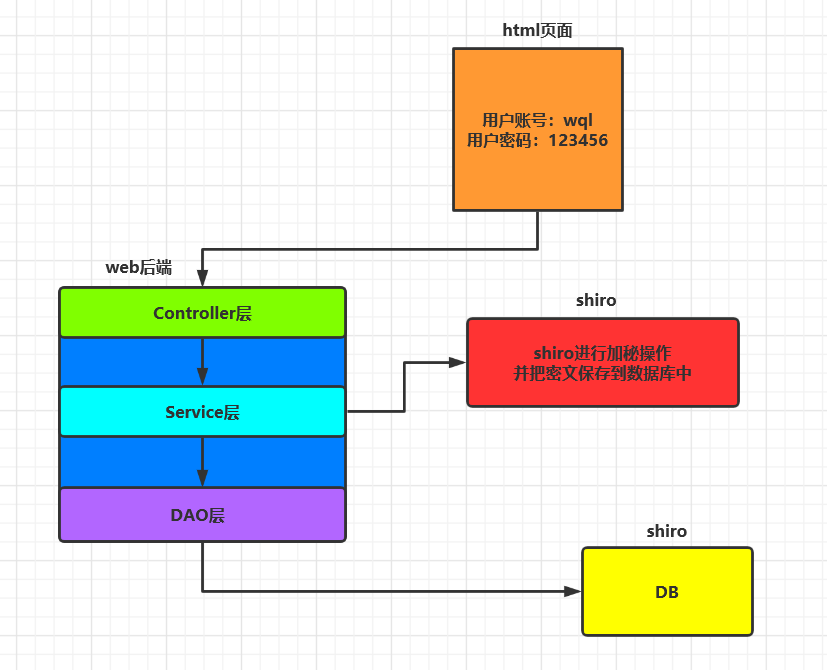
public static void main(String[] args) {

/*

Md5Hash在MD5的基础上又进行了散列处理

Md5Hash hash = new Md5Hash();这种处理方式不正确

hash.setBytes("123456".getBytes());

String a = hash.toHex();

System.out.println(a);

*/

//MD5标准用法 MD5是单独的类

Md5Hash md5Hash = new Md5Hash("123456");

System.out.println(md5Hash.toHex());

//使用MD5 + Salt处理

Md5Hash hash= new Md5Hash("123456","qwdasd");

System.out.println(hash.toHex());

//MD5 +Salt + hash散列

Md5Hash a=new Md5Hash("123456","asd",123);//这里散列123次

System.out.println(a.toHex());

}
public class authenticMD5 extends AuthorizingRealm {
protected AuthorizationInfo doGetAuthorizationInfo(PrincipalCollection principalCollection) {
return null;
}

protected AuthenticationInfo doGetAuthenticationInfo(AuthenticationToken authenticationToken) throws AuthenticationException {

String a=(String) authenticationToken.getPrincipal();

if(a.equals(a)){

return new SimpleAuthenticationInfo("wql",

"2c064f94210cdde60d828fd85a0671a3",

ByteSource.Util.bytes("123456"),//加Salt操作,在判断时会先加上salt后加密

this.getName());

}

return null;

}
public static void main(String[] args) {

//1,创建安全管理器

DefaultSecurityManager securityManager = new DefaultSecurityManager();

//创建自定义Realm实例

authenticMD5 authenticMD5= new authenticMD5();

//创建Hash算法匹配器

HashedCredentialsMatcher hashedCredentialsMatcher= new HashedCredentialsMatcher();

//设置匹配器中的算法类型

hashedCredentialsMatcher.setHashAlgorithmName("md5");

//设置散列的次数

hashedCredentialsMatcher.setHashIterations(123);//默认是一次

//将算法匹配器加入到Realm中

authenticMD5.setCredentialsMatcher(hashedCredentialsMatcher);

//2,给安全管理器设置realm(获取安全实体数据源)

securityManager.setRealm(authenticMD5);

//3,SecurityUtils 给全局的安全工具类设置安全管理器

SecurityUtils.setSecurityManager(securityManager);

//4,提供工具类获取subject关键对象

Subject subject = SecurityUtils.getSubject();

//5,创建令牌

UsernamePasswordToken token = new UsernamePasswordToken("wql","123456");

try {

subject.login(token);

//常见异常UnknownAccountException用户名不存在 IncorrectCredentialsException密码不存在

}catch (UnknownAccountException a){

System.out.println("用户名不存在!!");

}catch (IncorrectCredentialsException e){

System.out.println("密码不存在");
}

}
<!--Springboot的shiro-->
<dependency>
    <groupId>org.apache.shiro</groupId>
    <artifactId>shiro-spring-boot-starter</artifactId>
    <version>1.5.3</version>
</dependency>

<dependency>
    <groupId>org.springframework.boot</groupId>
    <artifactId>spring-boot-starter-web</artifactId>
</dependency>

<dependency>
    <groupId>org.projectlombok</groupId>
    <artifactId>lombok</artifactId>
    <optional>true</optional>
</dependency>

<dependency>
    <groupId>org.springframework.boot</groupId>
    <artifactId>spring-boot-starter-tomcat</artifactId>
    <scope>provided</scope>
</dependency>

<dependency>
    <groupId>org.springframework.boot</groupId>
    <artifactId>spring-boot-starter-thymeleaf</artifactId>
</dependency>

<dependency>
    <groupId>com.baomidou</groupId>
    <artifactId>mybatis-plus-boot-starter</artifactId>
    <version>3.4.2</version>
</dependency>

<dependency>
    <groupId>mysql</groupId>
    <artifactId>mysql-connector-java</artifactId>
    <version>5.1.49</version>
</dependency>
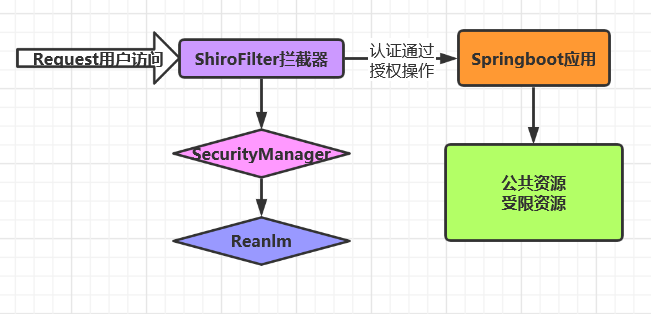
@Configuration

public class shiro_filter {

//1,创建shirofilter,负责拦截所有请求

@Bean

public ShiroFilterFactoryBean getShiroFilterFactoryBean(DefaultWebSecurityManager defaultWebSecurityManager){

ShiroFilterFactoryBean shiroFilterFactoryBean = new ShiroFilterFactoryBean();

//给拦截器工厂设置安全管理器

shiroFilterFactoryBean.setSecurityManager(defaultWebSecurityManager);

//配置受限资源和公共资源

Map<String,String> map =new HashMap<String,String>();

map.put("/index","authc");

///认证

// 界面路径

shiroFilterFactoryBean.setLoginUrl("/login");

shiroFilterFactoryBean.setFilterChainDefinitionMap(map);

return shiroFilterFactoryBean;

}

//2,创建安全管理器

@Bean

public DefaultWebSecurityManager getDefaultWebSecurityManager(Realm realm){

DefaultWebSecurityManager defaultWebSecurityManager=new DefaultWebSecurityManager();

//给安全管理器设置realm

defaultWebSecurityManager.setRealm(realm);

return defaultWebSecurityManager;

}

//3,创建自定义Realm

@Bean

public Realm getRealm(){

realm_ realm_a=new realm_();

HashedCredentialsMatcher hashedCredentialsMatcher = new HashedCredentialsMatcher();

hashedCredentialsMatcher.setHashAlgorithmName("md5");

realm_a.setCredentialsMatcher(hashedCredentialsMatcher);

return realm_a;

}}
@Override
protected AuthorizationInfo doGetAuthorizationInfo(PrincipalCollection principalCollection) {
return null;
}

@Override

protected AuthenticationInfo doGetAuthenticationInfo(AuthenticationToken authenticationToken) throws AuthenticationException {

appllicationContextUtil app = new appllicationContextUtil();

//提供appicationUtil工具类获取service类

wql_service wqlService =(wql_service)app.getbean("wql_service");

String auth = (String) authenticationToken.getPrincipal();

wql w = wqlService.sele(auth);

System.out.println("+++++++++++++++++++++++++++++++");

if(!ObjectUtils.isEmpty(w)){

SimpleAuthenticationInfo simpleAuthenticationInfo = new SimpleAuthenticationInfo(w.getName(),w.getRandom(),this.getName());

System.out.println(w.getName()+"-----"+w.getRandom());

return simpleAuthenticationInfo;

}

return null;
}}
@Component

public class appllicationContextUtil implements ApplicationContextAware {

static ApplicationContext applicationContexts;

@Override
public void setApplicationContext(ApplicationContext applicationContext) throws BeansException {

applicationContexts=applicationContext;

}

public static Object getbean(String beanname){

Object s=applicationContexts.getBean(beanname);

return s;

}}
@Service("wql_service")
public class wql_service {

@Autowired

wql_mapper wqlMapper;

public wql sele(String name){

wql s=wqlMapper.select_pass(name);

return s;

}

public boolean insert_fq(wql s){

Md5Hash md5Hash = new Md5Hash(s.getRandom());

s.setSalt("asd4a");

s.setRandom(md5Hash.toHex());

boolean sd=wqlMapper.insert_pass(s);

return sd;
}}
|
配置缩写
|
对应的过滤器
|
概念
|
|
anon
|
AnonymousFilter
|
指定url可以匿名访问,就是公共资源,不需要登录认证
|
|
authc
|
FormAuthenticationFilter
|
基于表单的拦截器;如“/**=authc”,如果没有登录会跳到相应的登录页面登录;主要属性:usernameParam:表单提交的用户名参数名( username); passwordParam:表单提交的密码参数名(password); rememberMeParam:表单提交的密码参数名(rememberMe); loginUrl:登录页面地址(/login.jsp);successUrl:登录成功后的默认重定向地址; failureKeyAttribute:登录失败后错误信息存储key(shiroLoginFailure)
|
|
perms
|
permissionsAuthorizationFilter
|
需要指定权限才能访问
|
|
port
|
portFilter
|
需要指定端口才能访问
|
|
roles
|
HttpMethodPermissionFilter
|
需要指定角色才能访问
|
|
logout
|
PermissionAuthorizationFilter
|
登出过滤器,配置指定url就可以实现退出功能
|
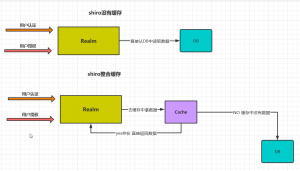
<dependency>
<groupId>org.apache.shiro</groupId>
<artifactId>shiro-ehcache</artifactId>
<version>1.5.3</version>
</dependency>
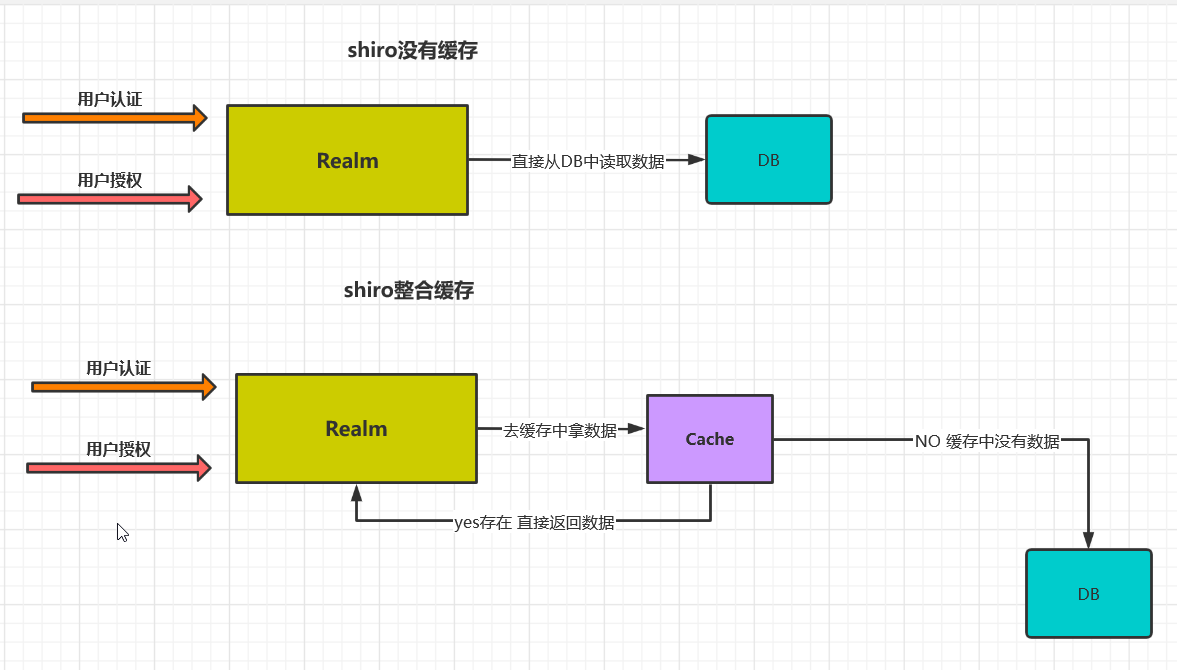
配置Realm开启缓存(在shiro拦截器中realm的方法中设置):、
@Bean

public Realm getRealm(){

realm_ realm_a=new realm_();

HashedCredentialsMatcher hashedCredentialsMatcher = new HashedCredentialsMatcher();

hashedCredentialsMatcher.setHashAlgorithmName("md5");

realm_a.setCredentialsMatcher(hashedCredentialsMatcher);

//开启Realm的缓存(使用EhCatche)

realm_a.setCacheManager(new EhCacheManager());

//开启全局的缓存

realm_a.setCachingEnabled(true);

//开启认证的缓存

realm_a.setAuthenticationCachingEnabled(true);

//开启授权的缓存

realm_a.setAuthorizationCachingEnabled(true);

//设置默认的名字

realm_a.setAuthenticationCacheName("AuthenticationionCache");

realm_a.setAuthorizationCacheName("AuthorizationCache");

return realm_a;
}
路漫漫其修远兮,吾将上下而求索
Comments | NOTHING