






一,SpringData Jpa的配置
非SpringData JPA一站式配置,采用Maven进行搭建
一,Maven XML配置Spring Data JPA
1,导入Maven依赖:
<?xml version="1.0" encoding="UTF-8"?>
<project xmlns="http://maven.apache.org/POM/4.0.0"
         xmlns:xsi="http://www.w3.org/2001/XMLSchema-instance"
         xsi:schemaLocation="http://maven.apache.org/POM/4.0.0 http://maven.apache.org/xsd/maven-4.0.0.xsd">
    <modelVersion>4.0.0</modelVersion>

    <groupId>org.example</groupId>
    <artifactId>SprigData-Dome</artifactId>
    <packaging>pom</packaging>
    <version>1.0-SNAPSHOT</version>
    <modules>
        <module>Jpa-Hibernate</module>
        <module>SpringData-JPA</module>
    </modules>

    <dependencyManagement>
        <dependencies>
            <dependency>
                <groupId>org.springframework.data</groupId>
                <artifactId>spring-data-bom</artifactId>
                <version>2021.1.2</version>
                <scope>import</scope>
                <type>pom</type>
            </dependency>
        </dependencies>
    </dependencyManagement>
    <dependencies>

        <dependency>
            <groupId>mysql</groupId>
            <artifactId>mysql-connector-java</artifactId>
            <version>8.0.27</version>
        </dependency>

        <!--Jpa的实现Hibernate-->
        <dependency>
            <groupId>org.hibernate</groupId>
            <artifactId>hibernate-core</artifactId>
            <version>5.6.5.Final</version>
        </dependency>

       <dependency>
           <groupId>org.springframework.data</groupId>
           <artifactId>spring-data-jpa</artifactId>
       </dependency>

      <dependency>
          <groupId>junit</groupId>
          <artifactId>junit</artifactId>
          <version>4.12</version>
          <scope>compile</scope>
      </dependency>

        <dependency>
            <groupId>com.alibaba</groupId>
            <artifactId>druid</artifactId>
            <version>1.2.8</version>
        </dependency>

        <dependency>
            <groupId>org.springframework</groupId>
            <artifactId>spring-test</artifactId>
            <version>5.3.14</version>
            <scope>test</scope>
        </dependency>

    </dependencies>
</project>
- entityManagerFactory,配置Jpa的工厂
- 声明JPA的实现类(或是适配器),使用Hibernate作为Jpa的实现
- 配置Hibernate的一些功能(如:是否按实体类生成表等)
- 创建数据源(使用Druid数据源)
- 开启声明式事务
- 开启包扫描
<?xml version="1.0" encoding="UTF-8"?>
<beans xmlns="http://www.springframework.org/schema/beans"
       xmlns:xsi="http://www.w3.org/2001/XMLSchema-instance"
       xmlns:jpa="http://www.springframework.org/schema/data/jpa" xmlns:tx="http://www.springframework.org/schema/tx"
       xsi:schemaLocation="http://www.springframework.org/schema/beans
     https://www.springframework.org/schema/beans/spring-beans.xsd
     http://www.springframework.org/schema/data/jpa
     https://www.springframework.org/schema/data/jpa/spring-jpa.xsd http://www.springframework.org/schema/tx http://www.springframework.org/schema/tx/spring-tx.xsd">

    <!--用于整合JPA,具体就是entity工厂和事务-->
    <jpa:repositories base-package="com.dao"
                      entity-manager-factory-ref="entityManagerFactory"
                      transaction-manager-ref="transactionManager"/>

    <!--创建JPA的entityManagerFactory工厂-->
    <bean name="entityManagerFactory" class="org.springframework.orm.jpa.LocalContainerEntityManagerFactoryBean">
        <!--声明JPA的适配器(实现类)-->
        <property name="jpaVendorAdapter">
            <!--Jpa的具体实现使用Hibernate-->
            <bean class="org.springframework.orm.jpa.vendor.HibernateJpaVendorAdapter">
                <!--如果数据库没有表是否按pojo自动生成-->
                <property name="generateDdl" value="true"/>
                <!--是否在日志中记录SQL-->
                <property name="showSql" value="true"/>
            </bean>
        </property>
        <!--扫描包-->
        <property name="packagesToScan" value="com.dao.*"/>
        <!--声明源-->
        <property name="dataSource" ref="dataSource"/>
    </bean>


    <!--数据源-->
    <bean name="dataSource" class="com.alibaba.druid.pool.DruidDataSource">
        <property name="username" value="root"/>
        <property name="password" value="123"/>
        <property name="driverClassName" value="com.mysql.jdbc.Driver"/>
        <property name="url" value="jdbc:mysql://localhost:3306/test"/>
    </bean>

    <!--声明式事务-->
    <bean class="org.springframework.orm.jpa.JpaTransactionManager" name="transactionManager">
        <!--声明entityManagerFactory的引用-->
        <property name="entityManagerFactory" ref="entityManagerFactory"/>
    </bean

    <!--开启声明式事务注解驱动-->
    <tx:annotation-driven transaction-manager="transactionManager"></tx:annotation-driven>
</beans>
3,POJO类
@Entity //声明这是Hibernate的实体类
@Table(name = "jdbctemplatetest")//跟表做映射
public class jdbctemplatetestpojo {
    @Id
    @GeneratedValue(strategy = GenerationType.IDENTITY)//主键的生成策略,这里是自增
    @Column(name = "id")
    int id;

    @Column(name = "name")
    String name;


    @Column(name = "money")
    int money;


    public int getId() {
        return id;
    }


    public void setId(int id) {
        this.id = id;
    }


    public String getName() {
        return name;
    }


    public void setName(String name) {
        this.name = name;
    }


    public int getMoney() {
        return money;
    }


    public void setMoney(int money) {
        this.money = money;
    }
}
4,Repsitory接口
public interface CustomerRepsitory extends CrudRepository<jdbctemplatetestpojo, Integer> {

}
5,测试
@ContextConfiguration("/jpaConfig.xml")
@RunWith(SpringJUnit4ClassRunner.class)
public class test {

    @Autowired(required = true)
    CustomerRepsitory customerRepsitory;

    @Test
    public void selectget(){
        Optional<jdbctemplatetestpojo> byId = customerRepsitory.findById(1);

        System.out.println(byId.get().getName());
    }
}
结果:

二,Config配置类配置SpringData JPA
1,配置类
@Configuration
@EnableJpaRepositories("com.dao")
@EnableTransactionManagement
public class JpaManagerFoctoryConfig {
    @Bean
    public DataSource dataSource() {
        DruidDataSource druidDataSource = new DruidDataSource();
        druidDataSource.setUsername("root");
        druidDataSource.setPassword("123");
        druidDataSource.setDriverClassName("com.mysql.jdbc.Driver");
        druidDataSource.setUrl("jdbc:mysql://localhost:3306/test");
        return druidDataSource;
    }

    @Bean
    public LocalContainerEntityManagerFactoryBean entityManagerFactory() {
        HibernateJpaVendorAdapter vendorAdapter = new HibernateJpaVendorAdapter();
        vendorAdapter.setGenerateDdl(true);
        LocalContainerEntityManagerFactoryBean factory = new LocalContainerEntityManagerFactoryBean();
        factory.setJpaVendorAdapter(vendorAdapter);
        factory.setPackagesToScan("com.dao");
        factory.setDataSource(dataSource());
        return factory;
    }

    @Bean
    public PlatformTransactionManager transactionManager(EntityManagerFactory entityManagerFactory) {
        JpaTransactionManager txManager = new JpaTransactionManager();
        txManager.setEntityManagerFactory(entityManagerFactory);
        return txManager;
    }
}
@ContextConfiguration("JpaManagerFoctoryConfig.class")
@RunWith(SpringJUnit4ClassRunner.class)
public class test {

    @Autowired(required = true)
    CustomerRepsitory customerRepsitory;

    @Test
    public void selectget(){
        Optional<jdbctemplatetestpojo> byId = customerRepsitory.findById(1);

        System.out.println(byId.get().getName());
    }
}
结果:

三,SpringData Repsitories(插述)
Spring Data Repositories:抽象的目标是显著减少为各种持久性存储实现数据访问层所需的样版代码量
顶层Repositories的关系图:

1,CrudRepository接口
最常使用的是CrudRepository
CrudRepository的方法:
- <S extends T> S save(S entity):保存单条数据
- <S extends T> Iterable<S> saveAll(Iterable<S> entities):保存所有数据
- Optional<T> findById(ID id):id查询单条(Optional是JDK8的新特性防止空指针)
- boolean existsById(ID id):配置ID数据是否存在
- Iterable<T> findAll():查询所有
- Iterable<T> findAllById(Iterable<ID> ids):ID迭代查询
- long count():查询数据的条数
- void deleteById(ID id):按ID删除数据
- void delete(T entity):对象删除
- void deleteAllById(Iterable<? extends ID> ids):按ID迭代删除
- void deleteAll(Iterable<? extends T> entities):ID删除对象迭代删除
- void deleteAll():删除所有
2,PagingAndSortingRepository接口
PagingAndSortingRepository是CrudRepository子接口主要是实现分页和排序功能
PagingAndSortingRepository的方法:
- Iterable<T> findAll(Sort sort):排序,Sort 是排序对象
- Page<T> findAll(Pageable pageable):分页,Pageable为分页对象
二,自定义持久化操作
一般的持久化操作都可以提供继承Repositories接口来实现,当复杂的操作Repositories提供的方法是有局限性不能完成,所有需要使用自定义的持久化操作来实现复杂的SQL和业务
SpringData为了避免局限性提供了很多自定义操作
自定义操作的方式:
- JPQL(原生SQL)
- 规定方法名
- Query by Example
- 通过Specifications
- 通过Querydsl
一,JPQL和原生SQL自定义持久化操作
一,JPQL自定义持久化操作
JPQL是JPA提供的CRUD方式,它有特定的语法,与原生SQL语句有所不同
使用@Query标注方法进行JPQL查询
@Query的参数:
- String value() default "":具体的语句
- String countQuery() default "":查询条数
- boolean nativeQuery() default false:是否进行本地查询,就是不使用JPQL而是使用原生SQL进行查询,默认是使用JPQL进行查询
查询的返回值:
- 查询返回单个实体,就用POJO进行接收
- 查询返回多个实体就用POJO集合接收
两种参数的获取方式:
- 索引获取:?索引值
- 具名获取::参数名,结合@Param注解指定参数名字
注:在使用JPQL修改,插入和删除时返回值只能是void和int,虽然是自定义但还是需要继承Repository
JPQL本身不支持插入操作,但Hibernate在实现JPA时进行了改变,插入的值只能通过查询得到
例:
① POJO类(配置文件略)
@Entity //声明这是Hibernate的实体类
@Table(name = "jdbctemplatetest")//跟表做映射
public class jdbctemplatetestpojo {
    @Id
    @GeneratedValue(strategy = GenerationType.IDENTITY)//主键的生成策略,这里是自增
    @Column(name = "id")
    int id;

    @Column(name = "name")
    String name;

    @Column(name = "money")
    int money;

    public int getId() {
        return id;
    }

    public void setId(int id) {
        this.id = id;
    }

    public String getName() {
        return name;
    }


    public void setName(String name) {
        this.name = name;
    }

    public int getMoney() {
        return money;
    }

    public void setMoney(int money) {
        this.money = money;
    }

    @Override
    public String toString() {
        return "jdbctemplatetestpojo{" +
                "id=" + id +
                ", name='" + name + '\'' +
                ", money=" + money +
                '}';
    }
}
② 自定义JPQL
import com.dao.pojo.jdbctemplatetestpojo;
import org.springframework.data.jpa.repository.Modifying;
import org.springframework.data.jpa.repository.Query;
import org.springframework.data.repository.CrudRepository;
import org.springframework.data.repository.query.Param;
import javax.transaction.Transactional;
public interface CustomerRepsitory extends CrudRepository<jdbctemplatetestpojo, Integer> {

    //查询操作
    @Query("from jdbctemplatetestpojo pojo where pojo.id=?1")//select可以省略
    public jdbctemplatetestpojo getbyid(int id);


    //修改操作
    @Transactional//事务
    @Modifying//表示该方法为增删改方法
    @Query("UPDATE jdbctemplatetestpojo p SET p.name = :newname where p.id = :id  ")
    int updatepojo(@Param("newname") String name,@Param("id") int id);


    //删除方法
    @Transactional
    @Modifying
    @Query("DELETE FROM jdbctemplatetestpojo p WHERE p.id = ?1")
    int deletepojo(int id);


    //插入操作
    @Transactional
    @Modifying
    @Query("INSERT INTO jdbctemplatetestpojo (name, money) SELECT c.name, c.money FROM jdbctemplatetestpojo c WHERE c.id = ?1")
    int insertpojo(int id);
}
③ 测试
@ContextConfiguration(classes = JpaManagerFoctoryConfig.class)
@RunWith(SpringJUnit4ClassRunner.class)
public class test {

    @Autowired
    CustomerRepsitory customerRepsitory;

    @Test
    public void selectget(){
        jdbctemplatetestpojo getbyid = customerRepsitory.getbyid(1);

        System.out.println(getbyid);
    }

    @Test
    public void updata(){
        int kxj = customerRepsitory.updatepojo("KXJ", 2);
        System.out.println(kxj);
    }

    @Test
    public void delete(){
        int deletepojo = customerRepsitory.deletepojo(2);
        System.out.println(deletepojo);
    }


    @Test
    public void insert(){
        int insertpojo = customerRepsitory.insertpojo(1);
        System.out.println(insertpojo);
    }
}
二,SQL自定义持久化操作
把@Query的参数nativeQuery设置为true就表示使用原生SQL进行查询
例:
① 原生SQL
public interface CustomerRepsitory extends CrudRepository<jdbctemplatetestpojo, Integer> {

    @Query(value = "SELECT * FROM jdbctemplatetest where id = ?1",nativeQuery = true)//必须使用表名,而不能想JPQL一样使用类名
    public jdbctemplatetestpojo selectId(int id);
}
② 测试
@Test
public  void OriginSql(){
    jdbctemplatetestpojo jdbctemplatetestpojo = customerRepsitory.selectId(1);
    System.out.println(jdbctemplatetestpojo);
}
二,规定方法名自定义持久化操作
规定方法名自定义是JPA的一个特点,在其他框架是没有的,但实现复杂操作还是较为复杂
规定方法名指自定义操作包含两个部分:
- 主题关键字(前缀):决定方法的作用
- 谓词关键字:查询条件
主题关键字:

谓词关键字:
|
Sample
|
JPQL snippet
|
|
|
And
|
findByLastnameAndFirstname
|
… where x.lastname = ?1 and x.firstname = ?2
|
|
Or
|
findByLastnameOrFirstname
|
… where x.lastname = ?1 or x.firstname = ?2
|
|
Is,Equals
|
findByFirstname,findByFirstnameIs,findByFirstnameEquals
|
… where x.firstname = ?1
|
|
Between
|
findByStartDateBetween
|
… where x.startDate between ?1 and ?2
|
|
LessThan
|
findByAgeLessThan
|
… where x.age < ?1
|
|
LessThanEqual
|
findByAgeLessThanEqual
|
… where x.age <= ?1
|
|
GreaterThan
|
findByAgeGreaterThan
|
… where x.age > ?1
|
|
GreaterThanEqual
|
findByAgeGreaterThanEqual
|
… where x.age >= ?1
|
|
After
|
findByStartDateAfter
|
… where x.startDate > ?1
|
|
Before
|
findByStartDateBefore
|
… where x.startDate < ?1
|
|
IsNull
|
findByAgeIsNull
|
… where x.age is null
|
|
IsNotNull,NotNull
|
findByAge(Is)NotNull
|
… where x.age not null
|
|
Like
|
findByFirstnameLike
|
… where x.firstname like ?1
|
|
NotLike
|
findByFirstnameNotLike
|
… where x.firstname not like ?1
|
|
StartingWith
|
findByFirstnameStartingWith
|
… where x.firstname like ?1(parameter bound with appended %)
|
|
EndingWith
|
findByFirstnameEndingWith
|
… where x.firstname like ?1(parameter bound with prepended %)
|
|
Containing
|
findByFirstnameContaining
|
… where x.firstname like ?1(parameter bound wrapped in %)
|
|
OrderBy
|
findByAgeOrderByLastnameDesc
|
… where x.age = ?1 order by x.lastname desc
|
|
Not
|
findByLastnameNot
|
… where x.lastname <> ?1
|
|
In
|
findByAgeIn(Collection<Age> ages)
|
… where x.age in ?1
|
|
NotIn
|
findByAgeNotIn(Collection<Age> age)
|
… where x.age not in ?1
|
|
True
|
findByActiveTrue()
|
… where x.active = true
|
|
False
|
findByActiveFalse()
|
… where x.active = false
|
|
IgnoreCase
|
findByFirstnameIgnoreCase
|
… where UPPER(x.firstame) = UPPER(?1)
|
|
………………
|
……………………
|
……………………
|
例:
① 规定方法名
public interface StipulateMethod extends CrudRepository<jdbctemplatetestpojo, Integer> {

    //按照name查询
    jdbctemplatetestpojo findByName(String name);


    //判断用户是否存在
    boolean existsById(int id);


    //按照Name统计条数
    int countByName(String name);


    //按照ID和Name删除数据
    @Transactional//增删改时必须加上事务
    int deleteByIdAndName(int id,String name);

}
② 测试
@ContextConfiguration(classes = JpaManagerFoctoryConfig.class)
@RunWith(SpringJUnit4ClassRunner.class)
public class test1 {

    @Autowired
    StipulateMethod stipulateMethod;

    @Test
    public void findbyname(){
        jdbctemplatetestpojo fq = stipulateMethod.findByName("FQ");
        System.out.print(fq);
    }

    @Test
    public void existbyid(){
        boolean fq = stipulateMethod.existsById(1);
        System.out.print(fq);
    }

    @Test
    public void countbyname(){
        int fq = stipulateMethod.countByName("FQ");
        System.out.print(fq);
    }

    @Test
    public void deleteidandname(){
        int fq = stipulateMethod.deleteByIdAndName(1, "FQ");
        System.out.print(fq);
    }}
三,Query By Example自定义持久化操作
Query By Example只支持查询
- 不支持嵌套或分组的属性约束,如firstname = ?0等
- 只支持字符串start/contains/ends/regex匹配和其他属性类型的精准匹配
Example查询过程:
- Repository继承QueryByExampleExecutor
- 通过POJO对象设置查询条件
- Example构建POJO查询
1,QueryByExampleExecutor的源码:
public interface QueryByExampleExecutor<T> {
    //单条数据查询
    <S extends T> Optional<S> findOne(Example<S> example);
    //多条数据查询
    <S extends T> Iterable<S> findAll(Example<S> example);
    //多条数据查询并排序
    <S extends T> Iterable<S> findAll(Example<S> example, Sort sort);
    //分页查询
    <S extends T> Page<S> findAll(Example<S> example, Pageable pageable);
    //条数查询
    <S extends T> long count(Example<S> example);
    //数据是否存在
    <S extends T> boolean exists(Example<S> example);

    <S extends T, R> R findBy(Example<S> example, Function<FetchableFluentQuery<S>, R> queryFunction);
}
2,Example接口的源码
public interface Example<T> {

    //传入POJO对象构建查询
    static <T> Example<T> of(T probe) {
        return new TypedExample(probe, ExampleMatcher.matching());
    }

    //传入POJO对象构建查询,并使用ExampleMatcher进行条件过滤
    static <T> Example<T> of(T probe, ExampleMatcher matcher) {
        return new TypedExample(probe, matcher);
    }

    //获取POJO对象
    T getProbe();

    //获取条件匹配对象
    ExampleMatcher getMatcher();

    //获取pojo类
    default Class<T> getProbeType() {
        return ProxyUtils.getUserClass(this.getProbe().getClass());
    }
}
3,ExampleMatcher条件匹配器方法
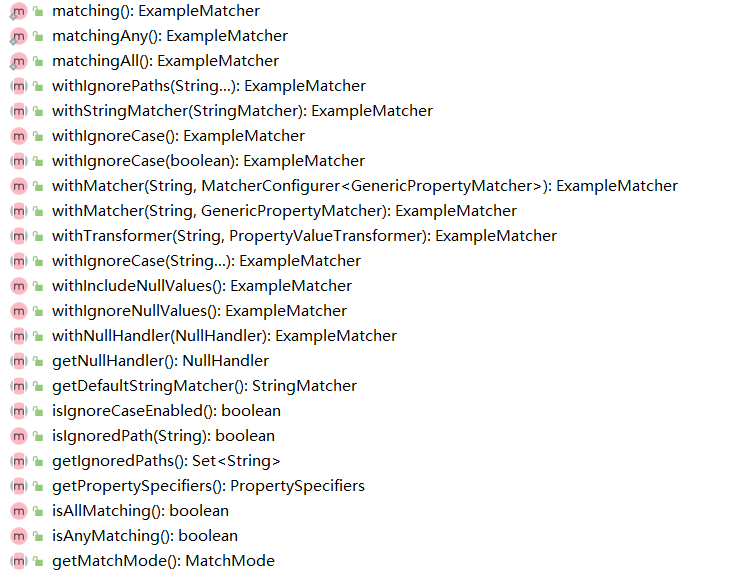
例:
① 接口
public interface QueryExampleExecutor extends CrudRepository<jdbctemplatetestpojo, Integer>, QueryByExampleExecutor<jdbctemplatetestpojo> {

//注:Repository接口是必须要继承的
}
② 测试
@ContextConfiguration(classes = JpaManagerFoctoryConfig.class)
@RunWith(SpringJUnit4ClassRunner.class)
public class test2 {

    @Autowired
    QueryExampleExecutor queryExampleExecutor;

    @Test
    public void findone(){
        //pojo实体类对象,通过对象设置查询条件
        jdbctemplatetestpojo pojo = new jdbctemplatetestpojo();
        pojo.setName("FQ");//设置查询的条件是Name为FQ

        //ExampleMatcher进行条件过滤
        ExampleMatcher exampleMatcher =ExampleMatcher.matching()
                                        .withIgnorePaths("id")//忽略id字段的条件
                                        .withIgnoreCase("name");//设置忽略name字段的大小写

        //通过pojo和exampleMatcher匹配器构建查询
        Example example =Example.of(pojo,exampleMatcher);

        //查询
        Optional<jdbctemplatetestpojo> one = queryExampleExecutor.findOne(example);

        System.out.print(one.get());
    }
}
四,QueryDSL自定义持久化操作
QueryDSL是基于ORM框架或SQL平台上的一个通用查询框架,借助QueryDSL可以在任何支持ORM框架或SQL平台上以通用API方式构建查询,JPA是QueryDSL的主要集成技术,是JPQL和Criteria查询的代替方法,目前QueryDSL支持的平台包括JPA,JDO,SQL,Mongodb等等
Querydsl拓展能让我们以链式方式代码编写查询方法,该拓展需要一个接口QueryDslPredicateExecutor,他定义了很多查询方法
一,QueryDSL环境的准备
① 导入QueryDSL第三方依赖:
<dependency>
    <groupId>com.querydsl</groupId>
    <artifactId>querydsl-jpa</artifactId>
    <version>4.2.1</version>
</dependency>
② 导入QueryDSL插件
<build>
    <plugins>
        <plugin>
            <groupId>com.mysema.maven</groupId>
            <artifactId>apt-maven-plugin</artifactId>
            <version>1.1.3</version>
            <dependencies>
                <dependency>
                    <groupId>com.querydsl</groupId>
                    <artifactId>querydsl-apt</artifactId>
                    <version>4.4.0</version>
                </dependency>
            </dependencies>
            <executions>
                <execution>
                    <goals>
                        <goal>process</goal>
                    </goals>
                    <configuration>
                        <!--在target目录生成/generated-sources/QueryDSL目录的Q类-->
                        <outputDirectory>target/generated-sources/QueryDSL</outputDirectory>
                        <processor>com.querydsl.apt.jpa.JPAAnnotationProcessor</processor>
                    </configuration>
                </execution>
            </executions>
        </plugin>
    </plugins>
</build>
③ compile编译项目
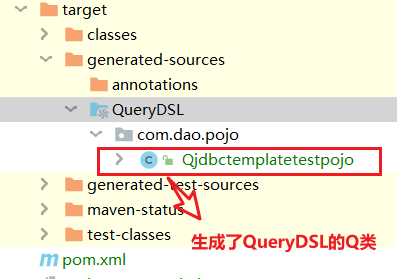
二,QueryDSL的使用
过程:前提必须生成POJO的Q类
- 继承接口CrudRepository和QuerydslPredicateExecutor<T>接口
- 实现Predicate,也就是生成的Q类,通过它进行条件匹配
- 调用QuerydslPredicateExecutor的查询方法传入Predicate对象
Q类的使用方法:Q类.实体变量.查询条件 (如:qjdbctemplatetestpojo.name.eq("").count();统计name的条数)
查询统计的方法:
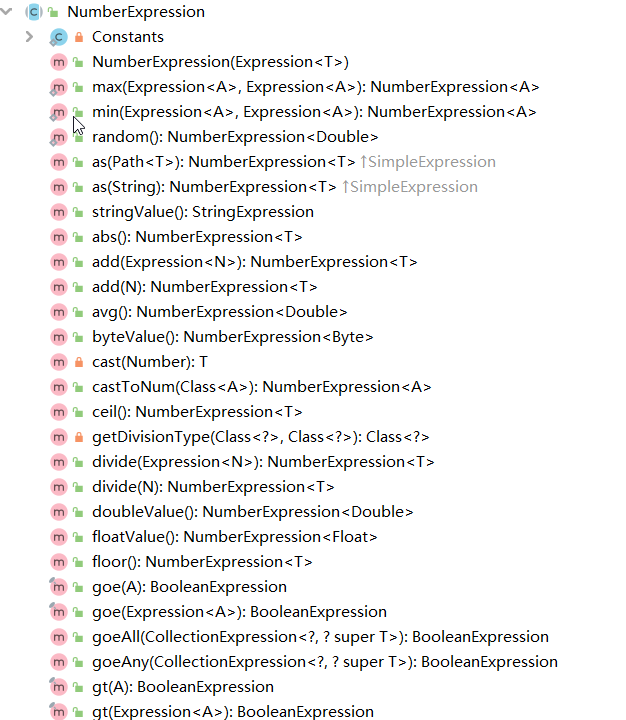
例:
① 接口
public interface QueryExampleExecutor extends CrudRepository<jdbctemplatetestpojo, Integer>, QueryByExampleExecutor<jdbctemplatetestpojo> {
}
② 测试
@ContextConfiguration(classes = JpaManagerFoctoryConfig.class)
@RunWith(SpringJUnit4ClassRunner.class)
public class test3 {

    @Autowired
    QueryDSL queryDSL;

    @Test
    public void find(){

        //通过QueryDSL的Q类生成查询对象
        Qjdbctemplatetestpojo qjdbctemplatetestpojo = Qjdbctemplatetestpojo.jdbctemplatetestpojo;

        //查询id为1的数据
        BooleanExpression eq = qjdbctemplatetestpojo.id.eq(1);

        Optional<jdbctemplatetestpojo> one = queryDSL.findOne(eq);

        System.out.print(one.get());
    }
}
三,QueryDSL动态条件和原生查询
一,QueryDSL动态条件查询
① 演示
@ContextConfiguration(classes = JpaManagerFoctoryConfig.class)
@RunWith(SpringJUnit4ClassRunner.class)
public class test5 {


    @Autowired
    QueryDSL queryDSL;

    @Test
    public void find() {

        jdbctemplatetestpojo jdbctemplatetestpojo= new jdbctemplatetestpojo();
        jdbctemplatetestpojo.setId(0);
        jdbctemplatetestpojo.setName("WQL,FQ");
        jdbctemplatetestpojo.setMoney(4000);

        Qjdbctemplatetestpojo qjdbctemplatetestpojo = Qjdbctemplatetestpojo.jdbctemplatetestpojo;
        //动态查询
        BooleanExpression expression = qjdbctemplatetestpojo.isNotNull().or(qjdbctemplatetestpojo.isNull());
        expression = jdbctemplatetestpojo.getId()>-1?
                qjdbctemplatetestpojo.id.gt(jdbctemplatetestpojo.getId()):expression;
        expression = StringUtils.isEmpty(jdbctemplatetestpojo.getName())?
                qjdbctemplatetestpojo.name.in(jdbctemplatetestpojo.getName().split(",")):expression;
        expression = StringUtils.isEmpty(jdbctemplatetestpojo.getMoney())?
                qjdbctemplatetestpojo.money.eq(4000):expression;

        System.out.print(queryDSL.findAll(expression));
    }    }
② 结果
[jdbctemplatetestpojo{id=1, name='WQL', money=4000}, jdbctemplatetestpojo{id=2, name='FQ', money=4000}]
二,原生查询
自定义列查询,分组需要使用原生态的方式
① 演示
@ContextConfiguration(classes = JpaManagerFoctoryConfig.class)
@RunWith(SpringJUnit4ClassRunner.class)
public class test6 {


    @PersistenceContext//为每一个线程绑定一个EntityManager,避免线程安全问题
    EntityManager entityManager;


    @Test
    public void ww(){


        JPAQueryFactory jpaQueryFactory = new JPAQueryFactory(entityManager);

        //QueryDSL的Q类
        Qjdbctemplatetestpojo pojo = Qjdbctemplatetestpojo.jdbctemplatetestpojo;

        //原生查询+QueryDSL
        JPAQuery<Tuple> wql = jpaQueryFactory.select(pojo.name, pojo.money)
                .from(pojo)
                .where(pojo.name.eq("WQL"))
                .orderBy(pojo.id.desc());


        List<Tuple> fetch = wql.fetch();


        for(Tuple s:fetch){
            System.out.print(fetch);
        }
    }
}
② 结果
[[WQL, 4000]]
Comments | NOTHING