






1. EasyExcel的介绍
EasyExcel是由阿里开源的excel解析读取写入框架,生成Excel比较有名的框架有Apache poi、jxl。但他们都存在一个严重的问题就是非常的耗内存,poi有一套SAX模式的API可以一定程度的解决一些内存溢出的问题,但POI还是有一些缺陷,比如07版Excel解压缩以及解压后存储都是在内存中完成的,内存消耗依然很大。easyexcel重写了poi对07版Excel的解析,一个3M的excel用POI sax解析依然需要100M左右内存,改用easyexcel可以降低到几M,并且再大的excel也不会出现内存溢出;03版依赖POI的sax模式,在上层做了模型转换的封装,让使用者更加简单方便
官方网站:
- 官方网站:https://easyexcel.opensource.alibaba.com/
- github地址:https://github.com/alibaba/easyexcel
- gitee地址:https://gitee.com/easyexcel/easyexcel
16M内存23秒读取75M(46W行25列)的Excel(3.2.1+版本):
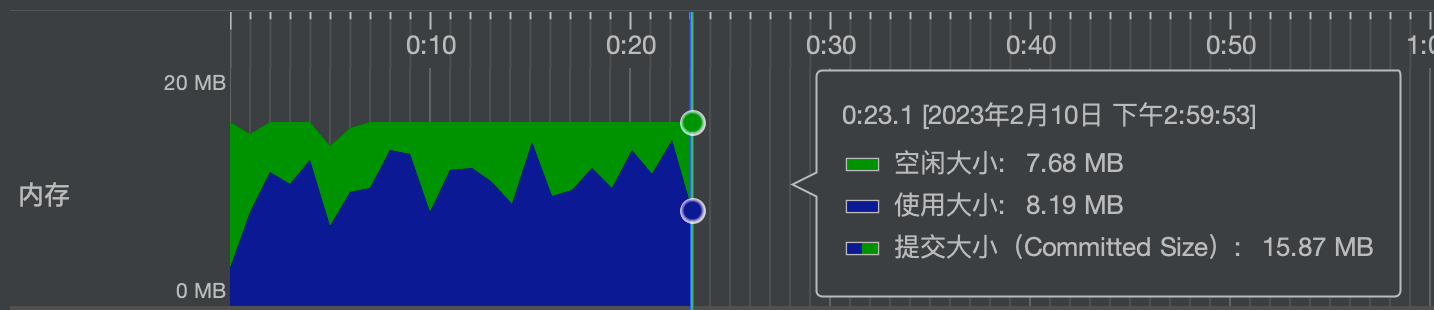
总结:EasyExcel是快速、简单、避免OOM的java处理Excel工具
注意:这个工具操作方法官方文档提供的非常详细,甚至连需求如何写的代码都有对应案例
2. EasyExcel写操作
2.1 写操作基本使用
引入依赖:
<dependency>
    <groupId>com.alibaba</groupId>
    <artifactId>easyexcel</artifactId>
    <version>3.1.1</version>
</dependency>
<dependency>
    <groupId>org.projectlombok</groupId>
    <artifactId>lombok</artifactId>
    <version>1.18.12</version>
    <scope>provided</scope>
</dependency>
使用步骤:
- 新建Excel模板类
- 通过工具操作类进行读写操作
@AllArgsConstructor
@NoArgsConstructor
@ToString
@Data
@EqualsAndHashCode
public class exceluserpojo {

    @ExcelProperty("用户编号")
    private Integer userId;

    @ExcelProperty("姓名")
    private String userName;

    @ExcelProperty("性别")
    private String gender;

    @ExcelProperty("工资")
    private Double salary;

    @ExcelProperty("入职时间")
    private Date hireDate;
}
- @ExcelProperty:这个注解的作用是描述设置Excel表格的头名称
② 写法一:使用链式调用写法
@Test
public void test01(){
    //创建Excel文档
    String fileName = "user1.xlsx";
    //根据exceluserpojo模板构建数据
    List<exceluserpojo> exceluserpojos = new ArrayList<exceluserpojo>();
    exceluserpojos.add(new exceluserpojo(1,"空想家","男",4000.99,new Date()));
    exceluserpojos.add(new exceluserpojo(2,"晴天","女",6000.99,new Date()));
    exceluserpojos.add(new exceluserpojo(3,"项庄","男",3000.99,new Date()));
    //向Excel表格中写数据
    EasyExcel.write(fileName,exceluserpojo.class).sheet("用户信息表").doWrite(exceluserpojos);
}
- write():文件写入的位置和对应模板类
- sheet():表对象设置,有参为表名称
- doWrite():具体写入什么数据,传入Collection的子类
③ 写法二:使用普通的对象写法
@Test
public void test02(){
    //创建Excel文档
    String fileName = "user1.xlsx";
    //根据exceluserpojo模板构建数据
    List<exceluserpojo> exceluserpojos = new ArrayList<exceluserpojo>();
    exceluserpojos.add(new exceluserpojo(1,"玄门","男",4000.99,new Date()));
    exceluserpojos.add(new exceluserpojo(2,"晴天","女",6000.99,new Date()));
    exceluserpojos.add(new exceluserpojo(3,"项庄","男",3000.99,new Date()));
    //获取ExcelWriterBuilder对象
    ExcelWriter execlWrite = EasyExcel.write(fileName, exceluserpojo.class).build();
    //创建sheet对象
    WriteSheet sheet = EasyExcel.writerSheet("用户信息").build();
    //将数据写入sheet标签中
    execlWrite.write(exceluserpojos,sheet);
    //关闭流,文件流手动关闭
    execlWrite.finish();
}
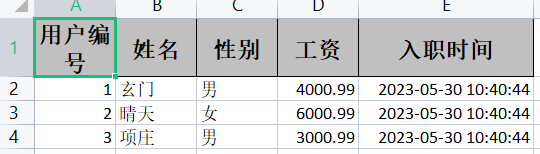
2.2 写操作高级使用
高级写法有:
- 排除某些字段写入
- 只允许某些字段写入
- 设置excel表格中列的顺序
- 复杂头写入
- 写入不同的sheet中
- 日期数字格式化
- 将图片写入excel
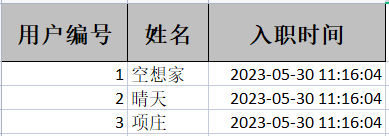
2.2.1 排除字段写入
步骤:
- 创建需要排除的属性集合,将表头名称传入
- 调用EasyExcel的excludeColumnFieldNames()方法排除对应的属性
演示:
//排除字段写入
@Test
public void test03(){
    //创建Excel文档
    String fileName = "excludeuser.xlsx";
    //根据exceluserpojo模板构建数据
    List<exceluserpojo> exceluserpojos = new ArrayList<exceluserpojo>();
    exceluserpojos.add(new exceluserpojo(1,"空想家","男",4000.99,new Date()));
    exceluserpojos.add(new exceluserpojo(2,"晴天","女",6000.99,new Date()));
    exceluserpojos.add(new exceluserpojo(3,"项庄","男",3000.99,new Date()));
    //设置排除的属性集合
    Set<String> set = new HashSet<>();
    set.add("salary");
    set.add("gender");


    //向Excel表格中写数据
    EasyExcel.write(fileName,exceluserpojo.class)
            //排除属性
            .excludeColumnFieldNames(set)
            .sheet("用户信息表")
            .doWrite(exceluserpojos);
}
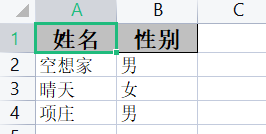
2.2.2 允许字段写入
步骤和排除字段写入相似:
- 创建需要写入的属性集合,将表头名称传入
- 调用EasyExcel的includeColumnFieldNames()方法排除对应的属性
//只允许字段写入
@Test
public void test04(){
    //创建Excel文档
    String fileName = "includeuser.xlsx";
    //根据exceluserpojo模板构建数据
    List<exceluserpojo> exceluserpojos = new ArrayList<exceluserpojo>();
    exceluserpojos.add(new exceluserpojo(1,"空想家","男",4000.99,new Date()));
    exceluserpojos.add(new exceluserpojo(2,"晴天","女",6000.99,new Date()));
    exceluserpojos.add(new exceluserpojo(3,"项庄","男",3000.99,new Date()));
    //设置排除的属性集合
    Set<String> set = new HashSet<>();
    set.add("userName");
    set.add("gender");

    //向Excel表格中写数据
    EasyExcel.write(fileName,exceluserpojo.class)
            //只包含属性
            .includeColumnFieldNames(set)
            .sheet("用户信息表")
            .doWrite(exceluserpojos);
}
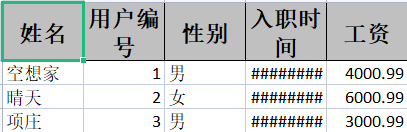
2.2.3 设置列的顺序
列的顺序设置通过模板类的@ExcelProperty中的index设置优先级
例:
@AllArgsConstructor
@NoArgsConstructor
@ToString
@Data
@EqualsAndHashCode
public class exceluserpojo {

    @ExcelProperty(value = "用户编号",index = 1)
    private Integer userId;

    @ExcelProperty(value = "姓名",index = 0)
    private String userName;

    @ExcelProperty(value = "性别",index = 2)
    private String gender;

    @ExcelProperty(value = "工资",index = 4)
    private Double salary;

    @ExcelProperty(value = "入职时间",index = 3)
    private Date hireDate;
}
写出测试:
2.2.4 复杂头写入
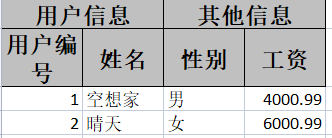
复杂头指的是多级表头,复杂头的设置在@ExcelProperty的value属性,value通过{}包含多个表头,第一个值为后面值的父表头
例:
@NoArgsConstructor
@ToString
@Data
@EqualsAndHashCode
public class themeuserpojo {
    @ExcelProperty(value = {"用户信息","用户编号"})
    private Integer userId;


    @ExcelProperty(value = {"用户信息","姓名"})
    private String userName;


    @ExcelProperty(value = {"其他信息","性别"})
    private String gender;


    @ExcelProperty(value = {"其他信息","工资"})
    private Double salary;
}
2.2.5 写入不同的sheet中
写不同的sheet需要使用对象式的写法,将sheet提取出来进行批量不同写入
例:
@Test//写入不同的sheet
public void test07(){
    //创建Excel文档
    String fileName = "diffsheet.xlsx";
    //根据exceluserpojo模板构建数据
    List<exceluserpojo> exceluserpojos = new ArrayList<exceluserpojo>();
    exceluserpojos.add(new exceluserpojo(1,"空想家","男",4000.99,new Date()));
    exceluserpojos.add(new exceluserpojo(2,"晴天","女",6000.99,new Date()));
    //获取ExcelWriter对象
    ExcelWriter excelWriter = EasyExcel.write(fileName, exceluserpojo.class).build();

    for(int i=0;i<4;i++){
        WriteSheet build = EasyExcel.writerSheet("用户表" + i).build();
        excelWriter.write(exceluserpojos,build);
    }
    excelWriter.finish();
}

2.2.6 日期数字格式化
格式化涉及到两个注解:
- @NumberFormat:数字格式化(使用#为占位符)
- @DateTimeFormat:日期格式化(yyyy MM dd等格式)
例:
@AllArgsConstructor
@NoArgsConstructor
@ToString
@Data
@EqualsAndHashCode
public class dataformatpojo {

    @NumberFormat("#.##")
    @ExcelProperty(value = "工资")
    private Double salary;

    @DateTimeFormat("yyyy年MM月dd日")
    @ExcelProperty(value = "入职时间")
    private Date hireDate;
}

2.2.7 将图片写入excel
将文件写入excel可以使用多种对象方式:
- 抽象文件类表示(File)
- 输入流表示(InputStream)
- String表示
- 二进制数据保存一张图片
- url保存一张图片
例:
① 模板类
@AllArgsConstructor
@NoArgsConstructor
@ToString
@Data
public class ImageData {
    //使用抽象文件表示一个图片
    private File file;

    //使用输入流保存一个文件
    private InputStream inputStream;

    //使用String类型表示保存一个图片,需要使用StringImageConverter转换器
    @ExcelProperty(converter = StringImageConverter.class)
    private String imgStr;

    //使用二进制数据保存为一种图片
    private  byte[] byteArray;

    //使用网络链接保存一个图片
    private URL url;
}
② 写入操作
@Test
public void test() throws IOException {

    String name = "imageuser.xlsx";

    ArrayList<ImageData> arrayList = new ArrayList<>();
    ImageData imageData = new ImageData();
    imageData.setFile(new File("wql.jpg"));
    imageData.setInputStream(new FileInputStream(new File("wql.jpg")));
    imageData.setImgStr("wql.jpg");
    imageData.setUrl(new URL("https://wql.luoqin.ltd/wp-content/uploads/2022/06/1-2.jpg"));


    byte[] b = new byte[(int)new File("wql.jpg").length()];
    FileInputStream fileInputStream = new FileInputStream("wql.jpg");
    fileInputStream.read(b,0,(int)new File("wql.jpg").length());
    imageData.setByteArray(b);
    //添加到集合
    arrayList.add(imageData);

    EasyExcel.write(name,ImageData.class).sheet("图片写入表").doWrite(arrayList);
}

3. EasyExcel读操作
3.1 简单读操作
简单读操作两种写法:
- 链式调用写法
- 对象式写法
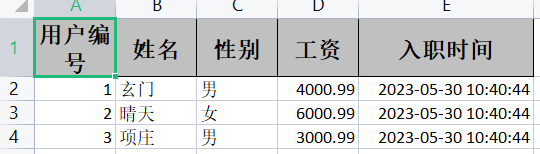
和写一样读操作需要指定需要读的文件地址、接收的模板对象(如果xslx一样写入模板可以和读取模板一样),最后最重要的是使用AnalysisEventListener回调函数(可以单独声明也可以使用匿名内部类)
读入的xslx:
接收的模板对象:和写模板一样
@AllArgsConstructor
@NoArgsConstructor
@ToString
@Data
public class exceluserpojo {

    private Integer userId;

    private String userName;

    private String gender;

    private Double salary;

    private Date hireDate;
}
例:
① 第一种写法:链式调用,最后需要指定sheet并提供doread触发读取
@Test
public void easyreadtest() throws IOException {

    String filepathname = "G:\\Java-Dome\\EasyExcel-Dome\\user1.xlsx";

    EasyExcel.read("G:\\Java-Dome\\EasyExcel-Dome\\user1.xlsx", exceluserpojo.class, new AnalysisEventListener<exceluserpojo>() {
        @Override
        public void invoke(exceluserpojo o, AnalysisContext analysisContext) {
            System.out.println(o);
        }

        @Override
        public void doAfterAllAnalysed(AnalysisContext analysisContext) {

        }
    }).sheet().doRead();
}
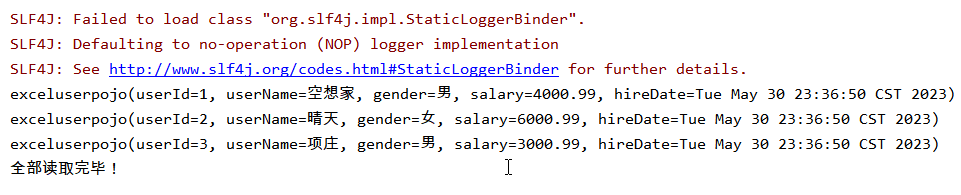
② 第二种写法:对象调用
@Test
public void easyreadtest2() throws IOException {
    String filepathname = "G:\\Java-Dome\\EasyExcel-Dome\\user1.xlsx";


    ExcelReader excelReader = EasyExcel.read("G:\\Java-Dome\\EasyExcel-Dome\\user1.xlsx", exceluserpojo.class, new AnalysisEventListener<exceluserpojo>() {
        @Override
        public void invoke(exceluserpojo o, AnalysisContext analysisContext) {
            System.out.println(o);
        }

        @Override
        public void doAfterAllAnalysed(AnalysisContext analysisContext) {
            System.out.println("全部读取完毕!");
        }
    }).build();

    //创建sheet对象,并读取excel的第1个sheet(下标从0开始)
    ReadSheet sheet = EasyExcel.readSheet(0).build();
    excelReader.read(sheet);
    //关闭流操作,在读取文件时会创建临时文件,如果不关闭,磁盘会爆掉
    excelReader.finish();
}
3.2 高级读操作
高级读操作有:
- 通过列名称或者下标获取指定列
- 读取数据进行格式化
- 读取全部的sheet表格
- 读取指定sheet表格
3.2.1 读取指定列
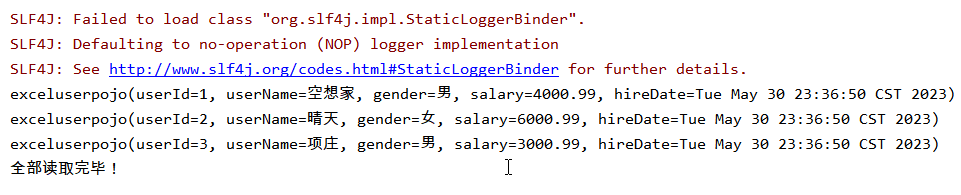
读取指定列指的是将对应列读取到对应模板类的属性中,这个也是借助@ExcelProperty它不仅可以在写中使用在读取中也需要通过它进行匹配性的读入
指定列读取:
- @ExcelProperty(value=""):通过名称读入指定列到指定类属性
- @ExcelProperty(index=""):通过下标读入指定列到指定类属性
读入的xslx:
模板:
@EqualsAndHashCode
@Data
public class exceluserpojo {

    @ExcelProperty(value = "用户编号")
    private Integer userId;

    @ExcelProperty(value = "姓名")
    private String userName;

    @ExcelProperty(value = "性别")
    private String gender;

    @ExcelProperty(value = "工资")
    private Double salary;

    @ExcelProperty(value = "入职时间")
    private Date hireDate;

}
例:
@Test
public void easyreadtest() throws IOException {

    String filepathname = "G:\\Java-Dome\\EasyExcel-Dome\\user1.xlsx";

    EasyExcel.read("G:\\Java-Dome\\EasyExcel-Dome\\user1.xlsx", exceluserpojo.class, new AnalysisEventListener<exceluserpojo>() {
        @Override
        public void invoke(exceluserpojo o, AnalysisContext analysisContext) {
            System.out.println(o);
        }

        @Override
        public void doAfterAllAnalysed(AnalysisContext analysisContext) {
            System.out.println("全部读取完毕!");
        }
    }).sheet().doRead();
}
3.2.2 读取格式化数据
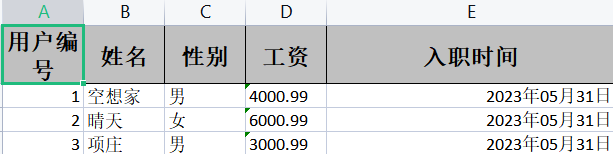
读取格式化数据也依赖EasyExcel的@NumberFormat和@DateTimeFormat注解,当读取的excel内容数据是格式化的时,通过这个两个注解去匹配格式化数据进行读取不然读取时就会报错
注:当格式化读取数值类型时@NumberFormat失效,建议将类型换成String在读取后再转换成Double,不建议总结使用Double
读取数据内容格式:
读取模板:
@AllArgsConstructor
@NoArgsConstructor
@ToString
@Data
@EqualsAndHashCode
public class exceluserpojo {

    @ExcelProperty(value = "用户编号")
    private Integer userId;

    @ExcelProperty(value = "姓名")
    private String userName;

    @ExcelProperty(value = "性别")
    private String gender;

    @ExcelProperty(value = "工资")
    @NumberFormat("#.##")
    private String salary;

    @ExcelProperty(value = "入职时间")
    @DateTimeFormat("yyyy年MM月dd日")
    private Date hireDate;
}
例:
@Test
public void easyreadtest() throws IOException {

    String filepathname = "G:\\Java-Dome\\EasyExcel-Dome\\user1.xlsx";

    EasyExcel.read("G:\\Java-Dome\\EasyExcel-Dome\\user1.xlsx", exceluserpojo.class, new AnalysisEventListener<exceluserpojo>() {
        @Override
        public void invoke(exceluserpojo o, AnalysisContext analysisContext) {
            System.out.println(o);
        }

        @Override
        public void doAfterAllAnalysed(AnalysisContext analysisContext) {
            System.out.println("全部读取完毕!");
        }
    }).sheet().doRead();
}
3.2.3 读取全部sheet表格
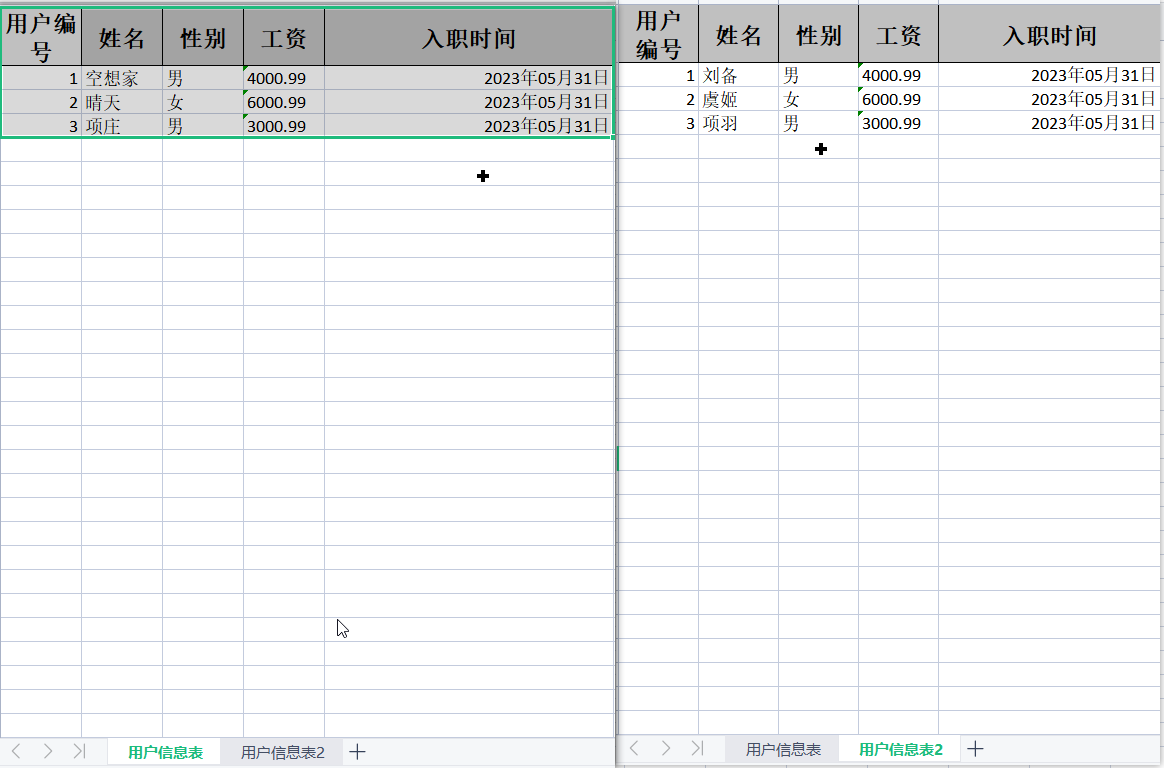
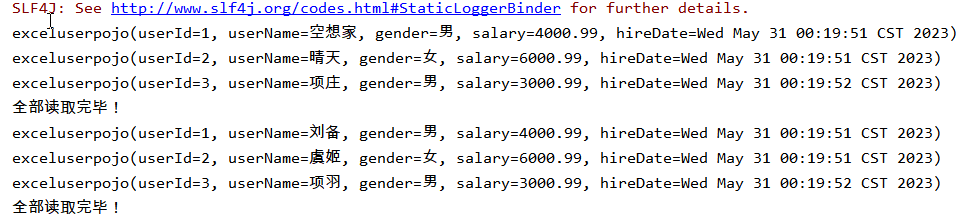
读取全部的sheet表格不需要指定sheet表格,但需要注意的是要保证所有的sheet使用的模板是一样的,不然如果某一个模板不匹配就会报错
- 全部读取是使用doReadAll()方法
读取的多个sheet数据:
模板:和读取格式化数据模板一样
例:每结束读取一个sheet会触发一次doAfterAllAnalysed()方法
@Test
public void Allreadtest() throws IOException {

    String filepathname = "G:\\Java-Dome\\EasyExcel-Dome\\user1.xlsx";

    EasyExcel.read("G:\\Java-Dome\\EasyExcel-Dome\\user1.xlsx", exceluserpojo.class, new AnalysisEventListener<exceluserpojo>() {
        @Override
        public void invoke(exceluserpojo o, AnalysisContext analysisContext) {
            System.out.println(o);
        }

        @Override
        public void doAfterAllAnalysed(AnalysisContext analysisContext) {
            System.out.println("全部读取完毕!");
        }
    }).doReadAll();
}
3.2.4 读取指定sheet表格
读取指定的sheet表格,可能每一个sheet数据模板不一样需要单独指定模板,EasyExcel提供了方便只需要创建一次ExcelReader对象,手动指定sheet和模板
指定读取sheet数据:

模板对象:
① exceluserpojo
@AllArgsConstructor
@NoArgsConstructor
@ToString
@Data
@EqualsAndHashCode
public class exceluserpojo {

    @ExcelProperty(value = "用户编号")
    private Integer userId;

    @ExcelProperty(value = "姓名")
    private String userName;

    @ExcelProperty(value = "性别")
    private String gender;

    @ExcelProperty(value = "工资")
    @NumberFormat("#.##")
    private String salary;

    @ExcelProperty(value = "入职时间")
    @DateTimeFormat("yyyy年MM月dd日")
    private Date hireDate;
}
② excludepojo
@AllArgsConstructor
@NoArgsConstructor
@ToString
@Data
@EqualsAndHashCode
public class excludepojo {
    @ExcelProperty(value = "用户编号")
    private Integer userId;

    @ExcelProperty(value = "姓名")
    private String userName;

    @ExcelProperty(value = "性别")
    private String gender;
}
例:
@Test
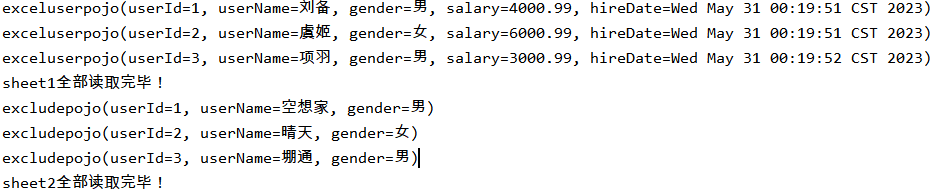
public void zhidreadtest() throws IOException {

    String filepathname = "G:\\Java-Dome\\EasyExcel-Dome\\user1.xlsx";

    ExcelReader excelReader = EasyExcel.read(filepathname).build();

    //读取第一个sheet
    ReadSheet readSheet1 = EasyExcel.readSheet(0).head(exceluserpojo.class).registerReadListener(new AnalysisEventListener<exceluserpojo>() {
        @Override
        public void invoke(exceluserpojo o, AnalysisContext analysisContext) {
            System.out.println(o);
        }
        @Override
        public void doAfterAllAnalysed(AnalysisContext analysisContext) {
            System.out.println("sheet1全部读取完毕!");
        }
    }).build();

    //读取第二个sheet
    ReadSheet readSheet2 = EasyExcel.readSheet(1).head(excludepojo.class).registerReadListener(new AnalysisEventListener<excludepojo>() {
        @Override
        public void invoke(excludepojo o, AnalysisContext analysisContext) {
            System.out.println(o);
        }


        @Override
        public void doAfterAllAnalysed(AnalysisContext analysisContext) {
            System.out.println("sheet2全部读取完毕!");
        }
    }).build();

    //批量读取两个sheet
    excelReader.read(readSheet1,readSheet2);
    //关闭流
    excelReader.finish();
}
4.EasyExcel其他操作
4.1 样式设置
EasyExcel写入时的样式设置包括:
- 列宽、行高、内容高度设置
- 头背景、头字体设置
- 内容背景、内容字体设置
4.1.1 列宽行高设置
列宽行高内容高度涉及到三个注解:
- @ContentRowHeight():设置内容高度
- @HeadRowHeight():设置标题高度
- @ColumnWidth():设置列宽
这些注解可标记在类上也可以标记的在属性上,标记在类上的注解可以控制属性的行高,标记在属性上的注解可以覆盖类上的控制
例:
① 模板类
@AllArgsConstructor
@NoArgsConstructor
@ToString
@Data
@ContentRowHeight(30)//设置内容高度
@HeadRowHeight(40)//设置标题高度
@ColumnWidth(25)//设置列宽
public class WidthAndHeighpojo {

    @ExcelProperty(value = "字符标题")
    private String title;

    @ExcelProperty(value = "内容")
    private String content;

    @ExcelProperty(value = "图片",converter= StringImageConverter.class)
    private String image;
}
② 操作
@DisplayName("列宽行高演示")
public class WidthAndHeighTest {
    @Test
    public void test() throws IOException {
        ArrayList<WidthAndHeighpojo> widthAndHeighpojos = new ArrayList<WidthAndHeighpojo>();
        widthAndHeighpojos.add(new WidthAndHeighpojo("空想家","中二少年不少年","wql.jpg"));

        EasyExcel.write("WidthAndHeigh.xlsx",WidthAndHeighpojo.class).sheet("列宽行高").doWrite(widthAndHeighpojos);

    }

4.1.2 样式设置
excel样式设置包括的注解:
- @HeadStyle:头背景颜色样式
- @HeadFontStyle:头字体样式
- @ContentStyle:内容的背景设置
- @ContentFontStyle:内容字体数字
这些注解可标记在类上也可以标记的在属性上,标记在类上的注解可以控制属性的行高,标记在属性上的注解可以覆盖类上的控制
其中在设置颜色时选择FillPatternTypeEnum.SOLID_FOREGROUND,EasyExcle提供IndexedColors颜色枚举类,在fillForegroundColor属性中输入对应的颜色标记即可
例:
① 模板类
//头背景设置成红色
@HeadStyle(fillPatternType = FillPatternTypeEnum.SOLID_FOREGROUND,fillForegroundColor =10)
//头字体大小设置成20
@HeadFontStyle(fontHeightInPoints = 20)
//设置内容背景颜色为蓝色
@ContentStyle(fillPatternType = FillPatternTypeEnum.SOLID_FOREGROUND,fillForegroundColor =4)
//内容字体设置成20
@ContentFontStyle(fontHeightInPoints = 20)
public class stylepojo {
    @ExcelProperty(value = "字符标题")
    private String title;

    @ExcelProperty(value = "内容")
    private String content;
}
② 操作
@Test
public void test() throws IOException {
    ArrayList<stylepojo> stylepojos = new ArrayList<stylepojo>();
    stylepojos.add(new stylepojo("空想家","中二少年不少年"));

    EasyExcel.write("WidthAndHeigh.xlsx",stylepojo.class).sheet("样式").doWrite(stylepojos);
}

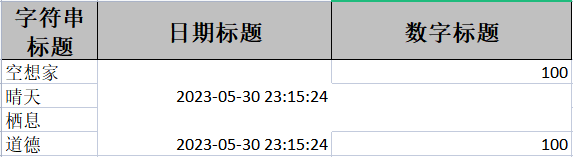
4.2 合并单元格
合并单元格的注解:
- @ContentLoopMerge:每列对行的合并
- @OnceAbsoluteMerge:列的合并,指定从那一行开始,那一行结束,那一列开始,那一列结束,参数如下
- firstRowIndex:起始行的索引,从0开始
- lastRowIndex:结束行索引
- firstColumnIndex:起始列索引
- lastColumnIndex:结束列索引
例:
① 模板类
@AllArgsConstructor
@NoArgsConstructor
@ToString
@Data
//将第2-3行的2-3列合并成一个单元格
@OnceAbsoluteMerge(firstRowIndex = 2,lastRowIndex = 3,firstColumnIndex = 1,lastColumnIndex = 2)
public class mergerowpojo {

    @ExcelProperty(value = "字符串标题")
    private String str;

    //这一列每隔2行合并单元格
    @ContentLoopMerge(eachRow = 2)
    @ExcelProperty(value = "日期标题")
    private Date date;

    @ExcelProperty(value = "数字标题")
    private Double aDouble;
}
②操作
@DisplayName("合并单元格")
public class mergeTest {
    @Test
    public void test() throws IOException {
        ArrayList<mergerowpojo> mergerowpojo = new ArrayList<mergerowpojo>();
        mergerowpojo.add(new mergerowpojo("空想家",new Date(),100.0));
        mergerowpojo.add(new mergerowpojo("晴天",new Date(),100.0));
        mergerowpojo.add(new mergerowpojo("栖息",new Date(),100.0));
        mergerowpojo.add(new mergerowpojo("道德",new Date(),100.0));

        EasyExcel.write("mergerow.xlsx",mergerowpojo.class).sheet("样式").doWrite(mergerowpojo);
    }
}
4.3 数据填充
EasyExcel数据填充的步骤:
- 创建填充的excel模板
- 创建填充对象类
- 进行填充操作
填充模板也是一个Excel,它里面可以写通配占位符:通过{}包裹
- {name}:填充类对象的name属性(单对象填充)
- {.name}:表示填充列表中的所有类中的name属性(多对象填充)
- 如果{}仅仅只表示符号可以通过\进行转义
4.3.1 单对象填充
模板excel:

实体类:
@Data
@ToString
@AllArgsConstructor
@NoArgsConstructor
public class fullexcelpojo {

    private String nickname;

    private Integer age;
}
操作:
@Test
public void dangfulleasttest(){
    String exceltempalate = "G:\\Java-Dome\\EasyExcel-Dome\\TemplateExcel.xlsx";
    String filepath = "G:\\Java-Dome\\EasyExcel-Dome\\tptoExcel.xlsx";


    fullexcelpojo fullexcelpojo = new fullexcelpojo();
    fullexcelpojo.setNickname("空想家");
    fullexcelpojo.setAge(18);
    EasyExcel.write(filepath).withTemplate(exceltempalate).sheet().doFill(fullexcelpojo);
}
-
write:写入的文件路径
-
withTemplate:关联的模板
-
doFill:填充的类对象

4.3.2 多对象填充
模板Excel:

实体类:和单对象时一样
操作:
@Test
public void duofulleasttest(){
    String exceltempalate = "G:\\Java-Dome\\EasyExcel-Dome\\TemplateExcel.xlsx";
    String filepath = "G:\\Java-Dome\\EasyExcel-Dome\\tptoExcel.xlsx";

    ArrayList<fullexcelpojo> arrayList = new ArrayList<>();
    arrayList.add(new fullexcelpojo("空想家",18));
    arrayList.add(new fullexcelpojo("晴天",20));
    arrayList.add(new fullexcelpojo("火狐",12));
    arrayList.add(new fullexcelpojo("烤肉",2));
    EasyExcel.write(filepath).withTemplate(exceltempalate).sheet().doFill(arrayList);
}

5. EasyExcel文件操作
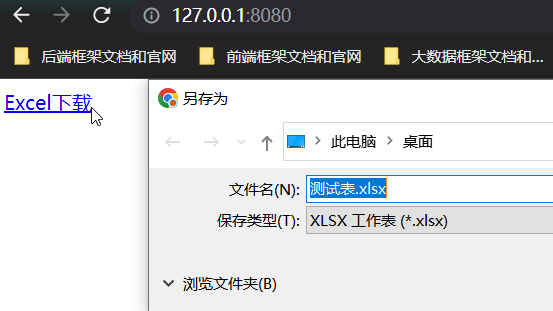
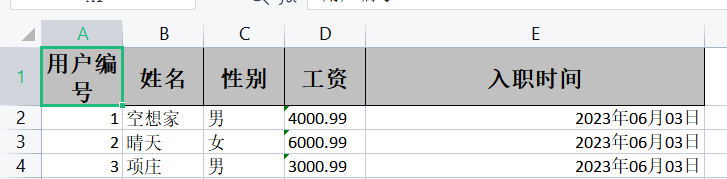
5.1 文件下载
下载过程:
- 构建execl模板对象
- 设置HttpServletResponse的响应信息和头信息
- EasyExcel写操作,输出流使用HttpServletResponse获取流
HttpServletResponse需要做的操作:
- 响应类型和编码
- 下载文件方式(1.附件下载 2.在当前浏览器打开)
- 获取输出流response.getOutputStream()
① 数据模板类
@AllArgsConstructor
@NoArgsConstructor
@ToString
@Data
@EqualsAndHashCode
public class exceluserpojo {

    @ExcelProperty(value = "用户编号")
    private Integer userId;

    @ExcelProperty(value = "姓名")
    private String userName;

    @ExcelProperty(value = "性别")
    private String gender;

    @ExcelProperty(value = "工资")
    @NumberFormat("#.##")
    private String salary;

    @ExcelProperty(value = "入职时间")
    @DateTimeFormat("yyyy年MM月dd日")
    private Date hireDate;
}
② 下载实现类
@Controller
public class downloadcontroll {

    @RequestMapping("/downloadexcel")
    public void downloadexcel(HttpServletResponse response) throws IOException {

        //设置响应类型和编码
        response.setContentType("application/vnd.ms-excel");
        response.setCharacterEncoding("utf-8");

        //下载的文件名
        String filename = "测试表.xlsx";

        //文件名的中文名称编码设置
        filename = URLEncoder.encode(filename,"utf-8");

        //下载文件方式(1.附件下载 2.在当前浏览器打开)
        response.setHeader("Content-dispostion","attachment="+filename+".xlsx");

        //根据exceluserpojo模板构建数据
        List<exceluserpojo> exceluserpojos = new ArrayList<exceluserpojo>();
        exceluserpojos.add(new exceluserpojo(1,"空想家","男","4000.99",new Date()));
        exceluserpojos.add(new exceluserpojo(2,"晴天","女","6000.99",new Date()));
        exceluserpojos.add(new exceluserpojo(3,"项庄","男","3000.99",new Date()));

        //输出流使用HttpServletResponse获取
        EasyExcel.write(response.getOutputStream(),exceluserpojo.class).sheet().doWrite(exceluserpojos);
    }
}
③ 简单下载网页
<!DOCTYPE html>
<html lang="en">
<head>
    <meta charset="UTF-8">
    <title>下载上传页面</title>
</head>
<body>
    <a href="http://127.0.0.1:8080/">Excel下载</a>
</body>
</html>
5.2 文件上传
上传过程:
- 导入commons-fileupload文件上传依赖
- 使用MultipartFile接收上传文件
- EasyExcel读取MultipartFile.getInputStream()输入流
- EasyExcel读取数据后的逻辑处理
上传文件:
① 模板对象(和下载一样)
②读取操作
@Controller
public class uploadcontroll {

    @RequestMapping(value = "/uploadexcel",method = RequestMethod.POST )
    @ResponseBody
    public String uploadexcel(@RequestParam("file") MultipartFile multipartFile) throws IOException {
        EasyExcel.read(multipartFile.getInputStream(), exceluserpojo.class, new AnalysisEventListener<exceluserpojo>() {
            @Override
            public void invoke(exceluserpojo exceluserpojo, AnalysisContext analysisContext) {
                System.out.println(exceluserpojo);
            }


            @Override
            public void doAfterAllAnalysed(AnalysisContext analysisContext) {
                System.out.println("上传文件读取完成");
            }
        }).sheet().doRead();

        return "上传成功";
    }
}
③ 上传html
<!DOCTYPE html>
<html lang="en">
<head>
    <meta charset="UTF-8">
    <title>上传页面</title>
</head>
<body>
    <form action="/uploadexcel" enctype="multipart/form-data"  method="post"  >
        <input type="file" name="file">
        <input type="submit" value="Excel上传">
    </form>
</body>
</html>

Comments | NOTHING